
Web Portals with Strapi and Astro

Benefits of Using Strapi with Astro
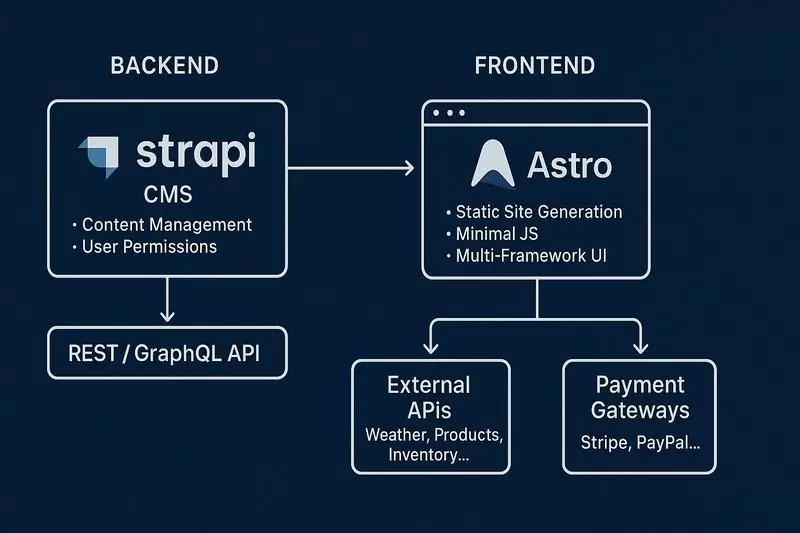
- Unmatched performance and speed: Astro is designed for speed, shipping zero JavaScript to the browser by default. Combined with Strapi as a headless CMS, it enables blazing-fast static (SSG) and dynamic (SSR) websites, resulting in excellent user experience and better SEO.
- “Islands” architecture for optimal interactivity: Astro allows creating interactive components (islands) using your favourite UI frameworks (React, Vue, Svelte, etc.) or plain JavaScript, while the rest of the page remains static. This minimises JavaScript code and shortens time to interactivity (TTI).
- Flexibility in UI framework choice: Astro does not enforce a single framework. You can use components from different libraries on the same page or rely only on HTML and JavaScript, giving developers maximum freedom.
- Multilingual support: Strapi natively supports multi-language content management. Combined with Astro, which also offers internationalisation features, this makes it easy to reach a global audience with tailored content.
- Scalability and security: The headless architecture separates backend (Strapi) from frontend (Astro). Both can be scaled independently. Strapi provides robust security features, while Astro’s statically generated pages are inherently less vulnerable to attacks.
- Advanced user interfaces and portals: The flexibility of Astro and Strapi allows building advanced interfaces such as client portals with registration and login. Users can manage their data, services, or personalised content, while administrators can easily manage content in Strapi.
What is Strapi in Detail?
Strapi is a headless CMS (Content Management System) built on Node.js, based on the Koa.js framework. This means it leverages JavaScript and asynchronous programming at the backend level. Strapi stores data in your chosen database (PostgreSQL, MySQL, SQLite, MongoDB, etc.). Content structures (content models) are defined by the developer using the admin panel or configuration files.
A key feature of Strapi is the automatic generation of APIs (Application Programming Interfaces) based on defined content models. Two main types of APIs are generated by default:
-
RESTful API: This API follows the REST (Representational State Transfer) architecture. Standard HTTP methods are used:
- GET: Retrieve data (e.g. list of articles, a specific entry). Data is returned in JSON format in the HTTP response body.
- POST: Create a new resource (e.g. submit a form). Data is usually sent in JSON format in the HTTP request body.
- PUT/PATCH: Update an existing resource. Data is also sent in JSON format in the HTTP request body.
- DELETE: Delete a resource.
Access to these endpoints is provided via specific URLs (URIs – Uniform Resource Identifiers), automatically generated based on your content model names (e.g. `/api/articles`, `/api/products`).
- GraphQL API: Strapi also provides a GraphQL-based API – a query language for your API. Unlike REST, where you typically get a fixed set of data, GraphQL allows clients (e.g. Astro) to request only the data they actually need. This improves efficiency and reduces data transfer. GraphQL uses HTTP POST requests, where the request body contains a GraphQL query string. The response is returned in JSON format. Strapi automatically generates a GraphQL schema based on your content models, including types, fields, queries, and mutations.
Authentication and authorisation in Strapi can be implemented in multiple ways, including JSON Web Tokens (JWT) for both REST and GraphQL APIs. This ensures secure access to content and admin functions.
How Does Astro Work with Strapi?
Astro, as a modern framework for building fast, content-focused websites, communicates with Strapi by sending HTTP requests to the APIs provided by Strapi. This can be either RESTful API or GraphQL API, depending on developer preferences and project requirements.
Fetching Data:
- RESTful API: In `.astro` files (server-side during build/render) or in client-side scripts (for dynamic interactions), you use standard `fetch` (or libraries like `axios`) to send HTTP GET requests to Strapi API endpoints. For example, to fetch articles, you send `GET /api/articles`. Strapi returns data in JSON, which Astro then uses to render HTML.
- GraphQL API: For GraphQL, Astro can use `fetch` with POST requests, sending a GraphQL query in the request body, or rely on lightweight GraphQL clients. You define queries to fetch the needed data and send them to Strapi’s GraphQL endpoint (usually `/graphql`). The JSON response is processed by Astro.
Submitting Data:
- RESTful API: To send data (e.g. contact forms, comments), Astro’s client-side scripts send HTTP POST, PUT, or PATCH requests to the corresponding Strapi API endpoints. Data is usually serialised to JSON in the request body.
- GraphQL API: For modifying data (e.g. creating or updating entries), Astro’s client-side scripts use GraphQL mutations sent to Strapi’s GraphQL endpoint via HTTP POST.
Where the data comes from:
- Strapi: Data is stored in the configured database. Strapi fetches, processes, and exposes this data via RESTful or GraphQL APIs in response to HTTP requests from Astro.
- Astro: Astro does not store content data itself. It fetches data from Strapi’s APIs and uses it to generate HTML pages (either statically during build or dynamically on the server). Astro may implement caching, but Strapi’s database is always the single source of truth.
Authentication and Authorisation in Combination
To protect content and Strapi APIs, authentication and authorisation mechanisms are used. Astro apps (especially client-side parts requiring access to protected resources) must authenticate correctly. This may involve sending tokens (e.g. JWT) in HTTP request headers, which Strapi verifies to determine access rights.
Static Site Generation (SSG) and Server-Side Rendering (SSR) in Astro
- SSG (Static Site Generation): Astro excels at SSG. Data from Strapi APIs is fetched at build time. Astro generates complete HTML files with the fetched data. When a user visits the page, they receive ready-made HTML, ensuring extremely fast load times. This is the default and preferred mode for many content-driven sites.
- SSR (Server-Side Rendering): Astro also supports SSR. In this mode, data from Strapi APIs is fetched on every user request to the Astro server. The server renders HTML with the latest data and sends it to the browser. This ensures fresh content, but may slightly increase server response time compared to SSG.
- “Islands” Architecture: Regardless of SSG or SSR, Astro enables “hydration” of only selected interactive components (islands) on the client side. Most of the page remains static (pure HTML and CSS), and JavaScript is loaded only where absolutely necessary, significantly improving performance.
Summary
The integration of Strapi and Astro relies on standard web protocols such as HTTP and data formats like JSON. Strapi acts as a powerful, flexible backend, exposing content via RESTful or GraphQL APIs. Astro, as a performance- and flexibility-focused frontend, consumes these APIs to build extremely fast websites, generating them statically (SSG) or rendering them on the server (SSR), while minimising JavaScript load thanks to the “islands” architecture. The choice between REST and GraphQL depends on project specifics and developer preferences.

Contact us to schedule a consultation
Frequently Asked Questions (FAQ) about Strapi and Astro
-
What is the headless CMS Strapi and how does it differ from traditional CMS?
Strapi is a headless content management system that separates the content management layer (backend) from the presentation layer (frontend). Unlike traditional CMS such as WordPress, Strapi does not dictate how content should be displayed. Instead, it provides APIs (RESTful or GraphQL) that any frontend application (e.g. Astro) can use to fetch and display content.
-
What are the benefits of combining Strapi with Astro?
The combination of Strapi and Astro provides multiple benefits, including unmatched speed and performance (thanks to Astro’s architecture and SSG), flexibility in choosing UI frameworks for interactive “islands,” multilingual support, scalability, security, and the ability to build advanced, fast user interfaces.
-
Is Strapi free and open-source?
Yes, Strapi is a free and open-source CMS. Its source code is available under the MIT license, which means it can be used, modified, and distributed without fees. Paid Strapi Cloud plans are also available, offering additional features and support.
-
What types of applications can be built with Strapi and Astro?
The Strapi and Astro stack is ideal for building content-driven websites such as blogs, company sites, news portals, documentation, e-commerce stores (especially with a Jamstack approach), as well as backends for mobile apps or any solution requiring dynamic content management and high frontend performance.
-
How does Strapi handle multilingual content?
Strapi includes built-in multilingual content management (i18n). It allows creating and managing content versions for different languages within a single admin panel. Astro can then fetch and display the correct language version using its own or external routing and internationalisation tools.
-
Is Strapi secure? What security measures does it provide?
Strapi is designed with security in mind. It offers user authentication, role- and permission-based access control (RBAC), protection against common web attacks (e.g. CSRF), and integration with external authentication providers (e.g. OAuth). Regular updates and an active community also contribute to its high level of security.
-
What are the hosting options for applications built with Strapi and Astro?
Strapi (Node.js backend) can be hosted on platforms like Heroku, AWS, Google Cloud, DigitalOcean, Railway, or VPS servers. Astro applications generated statically (SSG) can be hosted on static hosting platforms such as Vercel, Netlify, GitHub Pages, or Cloudflare Pages. Astro applications rendered server-side (SSR) require a Node.js environment, e.g. on Vercel, Netlify, or your own server.
-
Do Strapi and Astro require advanced programming knowledge?
Working with Strapi and Astro requires some programming knowledge, especially in JavaScript, HTML, CSS, and basic API concepts. Familiarity with Node.js helps with Strapi. Astro has a relatively gentle learning curve, but understanding its architecture (e.g. “islands”) is key. Strapi’s admin panel simplifies content management for non-technical users.
-
How does Strapi scale for large applications?
Strapi is built for scalability. Thanks to its headless architecture, backend (Strapi) and frontend (Astro) can be scaled independently. Strapi supports multiple databases that can be scaled, and it also offers caching and performance optimisation options. Strapi can also be deployed in microservices architectures for improved scalability.
-
What integration options does Strapi offer with other tools and services?
Strapi provides wide integration possibilities with other tools and services through its plugin system and standard APIs. It can be integrated with e-commerce systems, analytics tools, marketing automation platforms, payment systems, media clouds (e.g. Cloudinary, AWS S3), and many other services via REST or GraphQL APIs.