
Websites with WordPress and Next.js
Benefits of Using WordPress with Next.js
- Familiar and powerful CMS: WordPress is the world’s most popular content management system, offering an intuitive interface for editors and a vast number of plugins and themes (though in headless mode, themes serve a different purpose).
- Exceptional frontend speed and performance: Next.js allows static site generation (SSG) or server-side rendering (SSR) of content from WordPress, drastically improving load times, user experience (UX), and SEO compared to traditional WordPress sites.
- Enhanced security: Separating the frontend (Next.js) from the backend (WordPress) reduces the attack surface of the frontend application. Access to WordPress can be more restricted.
- Modern developer experience: Next.js offers developers a modern technology stack based on React and TypeScript, an optimized build process, and many built-in features that streamline development.
- Scalability: Both the WordPress backend and Next.js frontend can scale independently as needed. Next.js frontends are often hosted on global CDNs, ensuring high availability.
- Flexibility and extensibility: Access to WordPress data via REST or GraphQL APIs enables integrations with many other services and the creation of custom solutions.
What is Headless WordPress?
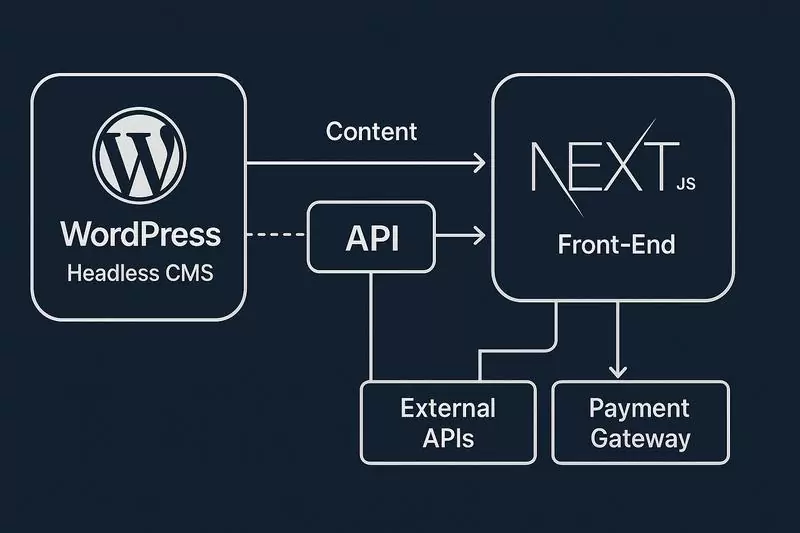
WordPress is an extremely popular content management system (CMS), written in PHP and using a MySQL database. Traditionally, WordPress handled both content management and presentation (via PHP themes). In a headless architecture, WordPress serves solely as the backend for content management, exposing it via APIs.
The key element of headless WordPress is its API (Application Programming Interface), which provides access to data:
-
WordPress REST API: A built-in API that delivers WordPress content in JSON (JavaScript Object Notation) format. It allows CRUD (Create, Read, Update, Delete) operations on posts, pages, users, taxonomies, and other data types using standard HTTP methods:
- GET: Retrieve data (e.g., `/wp-json/wp/v2/posts` to get a list of posts).
- POST: Create new resources (e.g., add a comment, create a post).
- PUT/PATCH: Update existing resources.
- DELETE: Delete resources.
Endpoints are accessed via specific URLs, e.g., `https://yourdomain.com/wp-json/wp/v2/`.
- WPGraphQL: A popular plugin that adds a GraphQL server to WordPress. GraphQL is a query language for APIs that allows the frontend (e.g., Next.js) to request exactly the data it needs, reducing over-fetching and under-fetching common with REST APIs. GraphQL queries are typically sent as HTTP POST requests to a single endpoint (e.g., `/graphql`).
Authentication in headless WordPress for privileged operations (e.g., creating content, accessing private data) can be managed with Application Passwords, JWT tokens (via plugins), or OAuth-based methods.
How Does Next.js Work with Headless WordPress?
Next.js, as a React framework for building frontend applications, communicates with headless WordPress through its APIs – REST or GraphQL – by sending HTTP requests.
Fetching Data:
- WordPress REST API: In Next.js components (e.g., in `getStaticProps`, `getServerSideProps`, or client-side using `useEffect` and `fetch`), the standard `fetch` function (or libraries like `axios`) is used to send HTTP GET requests to WordPress REST API endpoints. WordPress returns data in JSON, which Next.js processes and renders.
- WPGraphQL: For WPGraphQL, Next.js often uses GraphQL clients such as Apollo Client or urql, or even direct `fetch` with POST requests. GraphQL queries are defined to fetch only the required data, which WordPress (via WPGraphQL) returns in JSON.
Submitting Data:
For features like contact forms, comments, or other interactions that modify WordPress data:
- WordPress REST API: Next.js sends HTTP POST, PUT, or PATCH requests to relevant REST API endpoints, usually sending data as JSON in the request body. Proper authentication is required.
- WPGraphQL: GraphQL mutations are used to create, update, or delete data in WordPress.
Where the Data Comes From:
- WordPress: Content (posts, pages, custom post types, users, etc.) is stored in the WordPress MySQL database. WordPress exposes this data via REST or WPGraphQL APIs.
- Next.js: Next.js does not store content managed in WordPress. It fetches content dynamically (or at build time) and uses it to render the UI. Next.js may cache data for performance optimization, but the source of truth remains WordPress.
Authentication and Authorization
To protect WordPress content and operations, authentication mechanisms are required. Next.js must include valid credentials (e.g., tokens in HTTP headers) when accessing protected resources or performing write operations. WordPress validates these credentials to grant access.
Static Site Generation (SSG), Server-Side Rendering (SSR), and Incremental Static Regeneration (ISR) in Next.js
- SSG (Static Site Generation): With Next.js `getStaticProps`, data from the WordPress API is fetched at build time. Next.js pre-generates HTML files with this data, resulting in ultra-fast pages ideal for content that doesn’t change frequently (e.g., blog posts, info pages).
- SSR (Server-Side Rendering): With `getServerSideProps`, data from the WordPress API is fetched at each user request. The Next.js server renders HTML on the fly with the latest data. This is useful for dynamic or frequently updated content.
- ISR (Incremental Static Regeneration): Next.js allows static pages to be revalidated in the background at set intervals, without rebuilding the entire site. This delivers the performance of SSG with the freshness of live updates.
Summary
Combining WordPress as a headless CMS with Next.js as the frontend is a powerful solution. It merges the ease of content management in WordPress with the performance, security, and modern developer capabilities of Next.js. Communication happens via WordPress REST API or WPGraphQL, with Next.js using the data (in JSON format) to build UIs through SSG, SSR, or ISR, ensuring optimal end-user experiences.

Contact us to schedule a consultation
Frequently Asked Questions (FAQ) about WordPress and Next.js
-
What is headless WordPress and how is it different from traditional WordPress?
Headless WordPress is a setup where WordPress serves solely as a content management system (backend), while the presentation layer (frontend) is handled by a separate application, such as one built with Next.js. Traditional WordPress manages both content and its display through PHP themes. In headless WordPress, content is delivered via APIs (REST or GraphQL).
-
What are the benefits of combining WordPress with Next.js?
The main benefits include significant performance and load speed improvements (thanks to SSG/SSR/ISR in Next.js), better SEO, increased security through separation of frontend and backend, a modern development experience with React/Next.js, and the ability to use WordPress’s familiar interface for content management.
-
Is WordPress free and open-source?
Yes, the WordPress core software is free and open-source, released under the GNU General Public License (GPL). Costs may be associated with hosting, premium plugins, or themes (though in headless setups, themes play a smaller role on the frontend).
-
What types of applications can be built with WordPress and Next.js?
This technology stack is versatile and suitable for building blogs, corporate websites, news portals, e-commerce stores (e.g., WooCommerce as the product backend with Next.js as the store frontend), portfolios, and many other web applications where both content management ease and frontend performance are important.
-
How does WordPress handle multilingual content in a headless setup?
WordPress can manage multilingual content using popular plugins such as WPML or Polylang. These plugins typically extend the REST API or integrate with WPGraphQL to deliver translated content. Next.js can then fetch and display the appropriate language versions.
-
Is headless WordPress more secure?
A headless architecture can improve security. Separating the Next.js frontend from the WordPress backend means direct attacks on the frontend do not necessarily affect the WordPress database. WordPress itself still requires standard security practices (updates, strong passwords, admin panel protection).
-
What hosting options are available for WordPress + Next.js applications?
The WordPress backend can be hosted on any server supporting PHP and MySQL (traditional WordPress hosting). The Next.js application (frontend) can be deployed on platforms optimized for Next.js, such as Vercel (creators of Next.js), Netlify, AWS Amplify, Google Cloud Run, or any Node.js server.
-
Do you need advanced programming knowledge to work with WordPress and Next.js?
No programming skills are required to manage content in WordPress. However, building and maintaining the frontend in Next.js requires knowledge of JavaScript, React, and Next.js itself. Basic PHP knowledge may help with advanced WordPress modifications but is not necessary for headless usage.
-
How do WordPress and Next.js handle scalability?
With a headless architecture, the WordPress backend and Next.js frontend can scale independently. WordPress scalability can be improved through database and server optimization, while statically generated Next.js frontends scale exceptionally well via CDNs, enabling support for high traffic volumes.
-
What integration options does this stack offer with other tools?
WordPress has a vast ecosystem of plugins that can extend its functionality and APIs. Next.js, as a React application, has access to the npm ecosystem and can easily integrate with third-party services (e.g., payment systems, analytics, marketing tools) either directly in the frontend or via Next.js server functions.